How to test v2 before the release?
Ever wanted to try upcoming features before the release? Then read this

NOTE: If You don't know what are you doing don't do it. This is not a particularly easy process.
First steps
Here are a few things you need to have before cloning the github repo:
1. Git (don't have it? Learn how to install it here)
2. Have npm installed (also don't have it? Learn how to install npm with nodejs)
3. Have internet connection (obvious)
Go to the next step
2. Have npm installed (also don't have it? Learn how to install npm with nodejs)
3. Have internet connection (obvious)
Tip: When typing the commands dont type "$" (dolar-sign)
It is here to show you that this is a command
Cloning the repo
First: clone the repo with the react-refactor branch (IMPORTANT), You can use this command to make it easy:
$ git clone --branch react-refactor https://github.com/blueprint-site/blueprint-site.github.io Blueprint-site
This will copy the react-refactor branch to the Blueprint-site folder where your terminal was opened
Open it (cd Blueprint-site)
Running the site
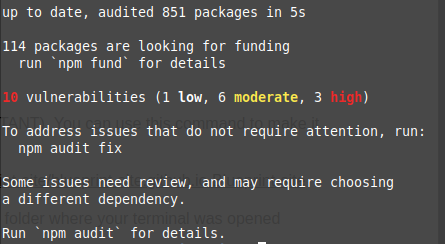
To actually run the app you need to install the dependencies for it, simply type
$ npm install
This should install the dependencies for you. You should see something like this:
To run the site you need to type:
$ npm run dev
Then you can type the url in your browser and you should see the site. (or type "o" and click enter)
The output should look like this:
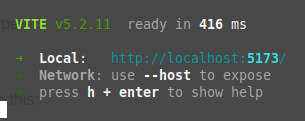
The URL you need to type into browser is (in this case) http://localhost:5173 or just localhost:5173
And that's all!
Now your copy of Blueprint v2 is up and running! if you want to keep updating it you can do it in 3 ways:
First method: You can manually delete and re-pull the folder with site files to update it (slow process)
Second method: You can type
$ git pull origin react-refactor
Once in so often, its faster to do that re-deleting and all that stuff.
Third method: If you have Visual Studio Code you can install Git extension and update the folder with a click of a button. You can search on the internet how to use VSC and it's git extension
Enjoy your copy of Blueprint v2!
Second method: You can type
$ git pull origin react-refactor
Once in so often, its faster to do that re-deleting and all that stuff.
Third method: If you have Visual Studio Code you can install Git extension and update the folder with a click of a button. You can search on the internet how to use VSC and it's git extension